

Procurement teams still spend a staggering amount of time re-keying supplier details across disconnected systems. According to a Hackett Group study, at least 50 percent of companies still rely on email, spreadsheets, or basic ERP screens to manage supplier onboarding. The result is slow cycle times, duplicated records, and compliance gaps that compound over months.
This article breaks down five distinct automation layers you can implement—incrementally or all at once—to strip manual data entry out of your supplier onboarding workflow for good.
Why Manual Supplier Onboarding Is a Liability, Not Just an Inconvenience
Before diving into solutions, it helps to quantify the problem. Manual onboarding doesn't just waste time—it actively degrades your data environment and exposes the organization to financial risk.
- Cost per supplier: Manual onboarding averages $700–$1,000 per supplier, while automation can cut that cost by 60–80 percent.
- Error propagation: Every manual step in a supplier onboarding workflow is a point of failure—a field left blank, a bank account entered by hand and never confirmed, or a compliance certificate uploaded once and never tracked for expiry.
- Cycle time: Large enterprises report onboarding timelines stretching to six months when processes are email-driven.
- AP impact: 47 percent of accounts-payable professionals cite manual data entry as their top challenge, and poor onboarding data directly leads to invoice processing delays and payment errors.
These aren't abstract risks. One industrial manufacturer discovered that 17 percent of its supplier records were duplicates—a remediation effort that could have been prevented with structured onboarding from the start.
Layer 1: Supplier Self-Service Portals With Conditional Logic
The single most impactful change is getting suppliers to enter their own data through a guided digital portal instead of emailing PDFs and spreadsheets back and forth.
How It Works
Suppliers receive a secure link to a registration form that collects essential business details—company name, tax identification number, contact information, banking details, and product or service categories. The form uses conditional logic so vendors only see questions relevant to their type.
- Vendor type branching: Service providers see fields for a master services agreement and certificate of insurance, while goods suppliers see shipping terms and product compliance documents.
- Country branching: International vendors are prompted for different tax documentation than domestic suppliers.
- Payment method branching: ACH vendors provide bank details; card-only vendors skip that section entirely.
Why It Matters
A well-designed portal collects the right data once—no duplicate forms, no 'send it in an email too.' It also improves data accuracy because suppliers know their own details better than a procurement analyst copying from a scanned document. Self-service portals reduce back-and-forth communication and ensure all required fields are completed before submission.
Practical tip: Start with two to three supplier categories. Do not over-segment on day one. Expand branching rules as you learn which fields actually drive downstream value.
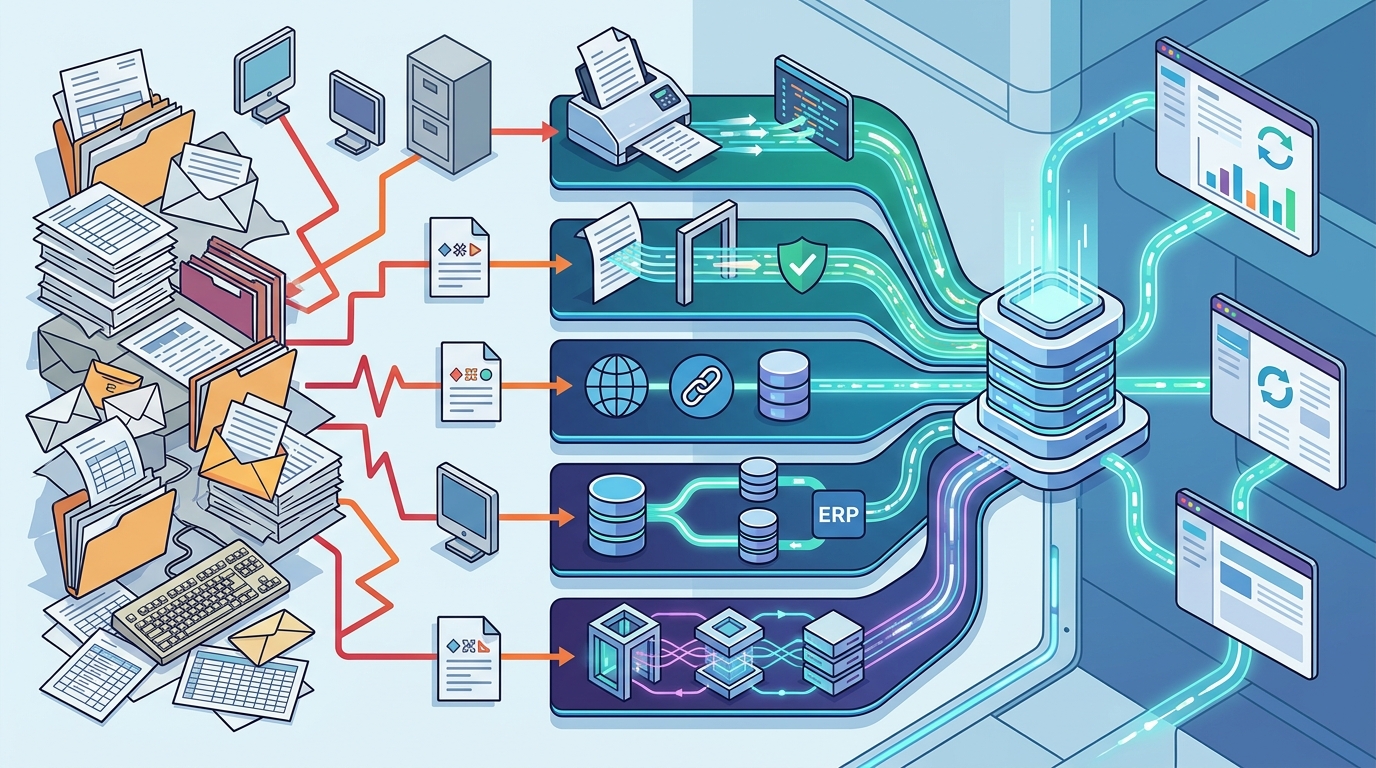
Layer 2: Real-Time Data Validation at the Point of Entry
Collecting data digitally is not enough if that data is wrong. Real-time validation catches errors before they ever reach your ERP.
Techniques to Deploy
- Field-level format checks: Tax IDs, phone numbers, and postal codes are validated against expected formats the moment a supplier types them.
- Bank account verification: Services confirm the account holder and routing numbers match the company, preventing misdirected payments.
- Duplicate detection: The system flags records that share a tax ID or address with an existing supplier, stopping duplicate records before they proliferate.
- Document validation with OCR: Optical Character Recognition extracts data from uploaded certificates, W-9 forms, and insurance documents, then cross-references it against the fields the supplier entered manually.
The Business Impact
Enforcing validation rules at the point of entry means errors are corrected in seconds instead of discovered weeks later during an invoice mismatch. A global manufacturing company that implemented a centralized portal with validation saw data errors reduced by more than 90 percent and onboarding time drop from 50 days to fewer than seven.
Layer 3: Automated Compliance and Risk Screening
Compliance verification is one of the most time-consuming parts of onboarding when done manually. Automated screening transforms it from a bottleneck into a background process.
What to Automate
- Sanctions and watchlist checks: Run the supplier against OFAC, EU, and other global sanctions lists at registration—and re-run periodically because lists change.
- Politically Exposed Person (PEP) checks: Flag higher-risk relationships that may require enhanced review.
- KYB/KYC-style verification: Verify the legal entity behind the supplier to reduce shell-company risk, using public registries and corporate registrars rather than relying solely on what the supplier submits.
- Beneficial ownership verification: Cross-check ownership structures against business databases.
- Certificate and license expiry monitoring: Track document expiry dates and trigger alerts before gaps appear—no one has to remember to check.
Risk-Based Segmentation
Not every supplier needs the same level of scrutiny. Segment suppliers by spend volume, geography, contractor status, and operational importance, then apply different tiers of review. Low-risk vendors with basic requirements should glide through automatically, while high-risk or incomplete submissions route to human reviewers with clear reason codes.
This layered approach keeps high-risk vendors tightly controlled while allowing low-risk suppliers to move quickly—a balance that keeps the business moving without compromising governance.
Layer 4: Workflow Orchestration and Intelligent Routing
Even after data is collected and validated, onboarding stalls if approvals sit in someone's inbox for days. Workflow automation routes tasks to the right stakeholder at the right time.
Core Capabilities
- Role-based routing: The system automatically determines whether Procurement, Legal, Compliance, or Finance needs to review a particular supplier—or all four in parallel.
- Escalation rules: If an approver doesn't act within a defined SLA, the request escalates to a backup or manager.
- Exception handling: Suppliers that fail a validation check or screening are routed to a dedicated exception queue with full context, rather than bouncing between email threads.
- Audit trail generation: Every decision is recorded—who approved what, when, and why. Exceptions are documented automatically, producing an audit trail that exists without anyone having to build it.
Why This Layer Is Often Overlooked
Many teams invest in portals and screening tools but leave approval workflows manual. Clear ownership and defined approval rules based on supplier category, spend threshold, and risk tier are essential to prevent the onboarding process from stalling. Without orchestration, automation gains in earlier layers are eroded by human bottlenecks in the middle.
Layer 5: Direct ERP and P2P System Integration
The final layer eliminates the last remaining manual re-entry point: transferring approved supplier data into your enterprise systems.
How Integration Works
API-based connections push validated supplier records—legal details, tax forms, banking information, payment terms—directly from the onboarding platform into your ERP, procure-to-pay, and accounts payable modules. Supplier information moves from onboarding into the ERP without manual re-entry, creating one source of truth rather than three slightly different versions.
What to Integrate
- Master data sync: Supplier name, addresses, tax IDs, and banking details populate the vendor master automatically.
- Contract and payment terms: Negotiated terms flow into the purchasing module so purchase orders reflect correct pricing from the first transaction.
- Catalog and PunchOut setup: For suppliers that support it, catalog data can be linked at onboarding so employees buy directly from approved vendors while purchases remain compliant and traceable.
- Ongoing data refresh: When a supplier updates their information in the portal, changes propagate to connected systems automatically.
The Payoff
From a financial perspective, onboarding is complete only when a supplier submits invoices and receives accurate payments without manual intervention. Direct integration closes that loop, ensuring the data that drives every downstream transaction is clean from the start.
Implementation Roadmap: Where to Start
You do not need to deploy all five layers simultaneously. A phased approach yields faster wins and cleaner adoption.
| Phase | Layer | Typical Timeline | Quick Win |
|---|---|---|---|
| 1 | Self-service portal | 4–8 weeks | Eliminates email-based data collection |
| 2 | Real-time validation | 2–4 weeks (add-on) | Catches errors before they enter any system |
| 3 | Compliance screening | 4–6 weeks | Removes manual sanctions and license checks |
| 4 | Workflow orchestration | 4–8 weeks | Cuts approval cycle time by days |
| 5 | ERP integration | 6–12 weeks | Eliminates final manual data re-entry |
Pick the most painful part of your process to automate first. For most teams, that is document collection or approvals. Then expand to risk screening and ERP sync once the intake data is clean.
KPIs to Track After Automation
Automation without measurement is just software. Monitor these metrics to prove ROI and identify further improvements:
- Average onboarding cycle time: Days from supplier invitation to transaction-ready status.
- Approval SLA adherence: Percentage of approvals completed within defined timeframes.
- Exception rate: Percentage of suppliers that fail automated checks and require human review.
- Supplier drop-off rate: Percentage of suppliers who start registration but never finish—a signal that your portal needs UX improvement.
- Data accuracy rate: Percentage of supplier records that pass downstream validation in the ERP without correction.
- Cost per onboarded supplier: Total resources consumed per new vendor, compared against the manual baseline.
Key Takeaways
- Manual supplier onboarding costs $700–$1,000 per supplier and introduces errors that propagate across every downstream transaction.
- A self-service portal with conditional logic is the single highest-impact first step—it shifts data entry to the people who know the data best.
- Real-time validation and OCR catch mistakes at the point of entry, not weeks later during invoice reconciliation.
- Automated compliance screening turns a multi-day bottleneck into a background process that runs in minutes.
- Workflow orchestration prevents human approval delays from negating the speed gains of earlier automation layers.
- Direct ERP integration closes the loop so no one ever re-types supplier data into another system.
- Start with the most painful bottleneck, prove value, then expand layer by layer.
Frequently Asked Questions
How long does automated supplier onboarding take compared to manual?
Manual onboarding at large organizations can stretch from several weeks to six months. Companies that implement portal-based automation with ERP integration have reduced cycle times from 50 days to under seven in documented cases. McKinsey research indicates end-to-end procurement automation can reduce cycle times by 50–70 percent overall.
What is the cost of manual supplier onboarding?
Industry benchmarks place manual onboarding at $700–$1,000 per supplier. Automation can reduce that cost by 60–80 percent by eliminating repetitive data collection, manual verification, and re-keying into enterprise systems.
Where should I start if I want to automate supplier onboarding?
Begin with the most time-consuming or error-prone step. For most procurement teams, that means deploying a supplier self-service portal to replace email-based data collection. Once intake data is clean and consistent, add validation, screening, workflow automation, and ERP integration in phases.
What technologies are used in supplier onboarding automation?
Common technologies include self-service supplier portals, Optical Character Recognition for document extraction, API integrations for ERP and P2P sync, Robotic Process Automation for repetitive tasks, Natural Language Processing for document classification, and machine learning for risk scoring and anomaly detection.
Does automation replace human review entirely?
No. Automation handles repetitive, rules-based tasks and routes exceptions to human reviewers. Low-risk suppliers move through automatically, while high-risk or flagged suppliers are escalated with full context so reviewers can make informed decisions quickly.